Technical Overview
Minor functionalities implemented outside of class requirements:
Mouse Driver: Allows for packets generated from moving and pressing the mouse to be recognized and responded to by the kernel. Works with text scrolling.
Command History: Supports up and down arrow presses to move between 5 most recent commands. Implemented seperately on each terminal.
CTRL+C: Support for terminating programs through CTRL+C.
Status Bar: Displays terminal number, process number, and current executing program.
Shell Commands
| Command |
Description |
| exit |
Quit the current shell program.
Will try to restart if the last shell in the current terminal is terminated. |
| clear |
Clears current terminal screen. |
| [Executable] [Arg] |
Search and open the program in the current terminal.
Some programs may require arguments (see below). |
File System Directory
| File Name |
File Kind |
Description |
| . |
Directory |
Holds information and refers to the directory itself. |
| sigtest |
Executable |
Argument: 0 or any. Used to test signals.
Use arg 0 to generate a PF without handler installed. |
| shell |
Executable |
Executes a new shell. The underlying program running in each terminal. |
| grep |
Executable |
Argument: a pattern. Prints lines that contain a match for the pattern. |
| syserr |
Executable |
Used to test illegal user program arguments. |
| rtc |
Device |
Gives user-level access to the real-time clock (RTC). |
| fish |
Executable |
Used to test vidmap and RTC. Display a fish animation in the current terminal. |
| counter |
Executable |
A numerical counter. |
| pingpong |
Executable |
Used to test RTC. Infiniately print a ping-pong animation in the current terminal. |
| cat |
Executable |
Argument: a file name. Open and read the content of a file/directory/device. |
| frame0.txt |
Regular File |
The fist frame of fish animation. |
| verylarge~.txt |
Regular File |
Used to test very long file name handling. |
| ls |
Executable |
List the directory. |
| testprint |
Executable |
Used to test the terminal driver. |
| created.txt |
Regular File |
Author information left by ECE 391 staff. |
| frame1.txt |
Regular File |
The second frame of fish animation. |
| hello |
Executable |
Used to test the terminal driver (input buffer). |
Assembly Linkages
Assembly linkage is implemented to connect interrupts, exceptions, and syscalls from the IDT into the desired handler.
Exception Handlers
Linkage pushes information and calls an unified exception handler.
Interrupt Handlers
Linkage pushes information and calls an unified interrupt handler.
The handler will dispatch to the corresponding drivers.
The IRQ lines are managed by two i8259 PICs just like any other classic IBM-compatible PC.
Supported Devices
Contains drivers for the standard keyboard, programmable interval timer (PIT), real-time clock (RTC), terminal, and mouse.
The standard keyboard driver adds support for capital letter handling and combinational keys.
The PIT driver is used to handle program scheduling.
The RTC driver supports frenquency adjusting and is "virtualized". Each process has its own RTC instance (see below).
The terminal driver is for standard input and output and works with keyboard driver. The input buffer is limited at 128-characters.
The mouse driver implements a mouse cursor and handles mouse packets. The mouse is usable in the GUI.
Memory Addressing
jOS bypasses segmentation by fixing each segment to correspond to the entire addresses space. Paging is used to implement virtual memory.
The memory layout is fixed (see below).
Physical Memory Layout
From low to high, 32MB of physical memory is utilized:
- 0 - 4MB: 4kB pages containing relevant video memory.
- 4MB - 8MB: 4MB page for all kernel data including PCBs and program stacks.
- 8MB - 32MB: 4MB pages for user programs.
Virtual Memory Layout
From low to high, the following in the 4GB virtual memory space is utilized:
- 4MB PT with several 4KB global superviser pages for the VRAM
- 4MB global superviser page for the kernel
- 4MB user page at 128MB for the current scheduled process
- 4KB user page for the vidmap
File System
The File System has a total size of 8MB, and is divided into 4KB blocks of one boot block, inodes, and data blocks.
Each boot block can track up to 62 inodes and one root directory, and each inode can track up to 1023 data blocks.
The limitations are up to 62 files of 4092KB size and 32 characters name length. Also, it generally does not support hierarchy and is read-only.
We have exteneded its implementation through the use of the VIM user program along with create and remove syscalls to allow the system to be writable.
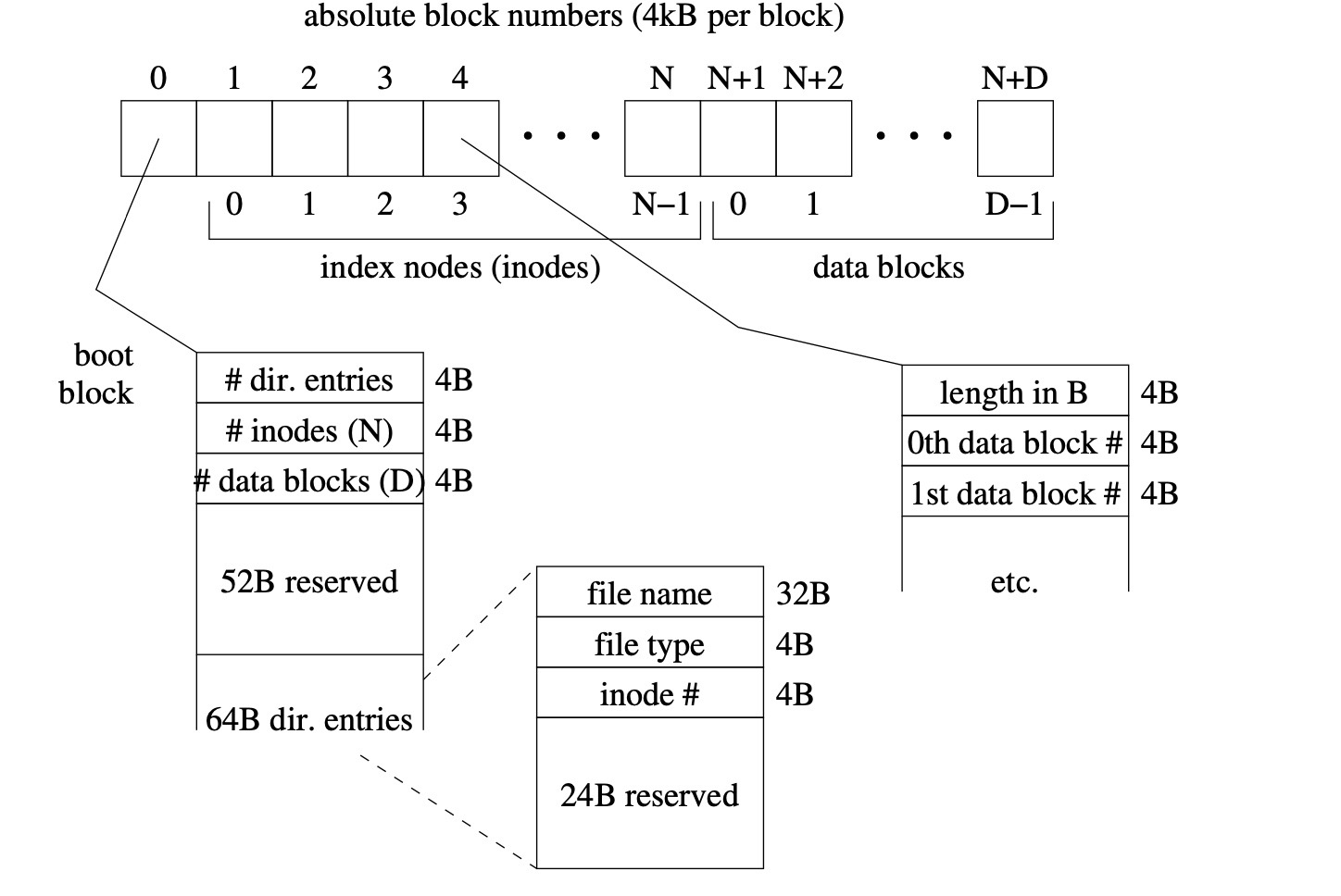
File System Abstraction
The OS treats any files, device (RTC), and directory as files. Each process has a dynamic file descriptor array (FD) that supports 8 open files.
According to the file type, each entry tracks inode, position, flags, and an operation jump table, and is utilized by syscalls (see below).
System Calls
| System Call |
Description |
| halt |
Halt the current program. |
| execute |
Load and execute a new program. |
| read |
Read data from a opened file (see file system abstraction above). |
| write |
Write data to a file (support terminal and device/RTC only). |
| open |
Allocate FD entry and open a file. |
| close |
Close the FD entry and close a file. |
| getargs |
Read the command line argument from shell. |
| vidmap |
Giving user-level access to the VRAM and map it to the user space. |
| set_handler |
Set custom handler for signal. |
| sigreturn |
Restore the hardware context from signal handler. |
Please note that the last two system calls are not implimented as signals are not present.
Extended System Calls
| System Call |
Description |
| create |
Used to insert or remove a file from the filesystem. |
| theme |
Used by the theme user program to modifiy the attribute colors of each terminal to set themes. |
| screen |
Used by various user programs to manage paging and screen saving. |
| edit_scroll |
Used by various user programs to enable or disable scrolling. |
| retrieve_key |
Syscall used by GUI and chip8 user programs to fetch current keyboard input. |
| retrieve_mouse |
Syscall used by GUI to access mouse data. |
| update_attrib |
Syscall used to modify the color for themes. |
Process Control
Supports up to 6 processes. Each process holds a process control block (PCB) in the kernel.
The kernel manages the PCB allocation by a custom design called PCB_t.
Each PCB tracks the allocated process ID (PID), parent PID, terminal ID, kernel/user stacks, FD, etc.
Multiterminals
Supports up to 3 terminals. Each terminal is independent of the others.
Scheduler
Supports a round-robin scheduler through sequential PIT interrupts.
The scheduler schedules 3 processes that is shown on each terminal, called active processes, so they can multitask.
But only one process is "actually" running, called running process.
GUI
Supports arrow keys or mouse for navigation. Click or press enter to select a program.
Some programs may require arguments. If this is the case, you must enter the arguments once the program is selected.
Chip8 Modified Emulator
Enter "chip8 |rom|"" to run the emulator. Avaialable roms: test, breakout, invaders, tetris, ibm.
Chip8 is a modified instruction set which many retro games have been ported to. In this OS, we have
made use of publicly available roms and simply created a program to translate their instructions.
User Programs
jOS implements several user programs. Run "help" to see a list of these programs.
Notable programs include: vim, rm, matrix, and theme.
Back to Top